This high performance network storage interface is designed for demanding film and television workflows where multiple editors and colourists need instant access to camera media without copying files. The unit allows removable disks to be mounted directly on a high speed network, creating a shared storage environment that is fast, flexible and easy to deploy both in studios and on set. Its focus is on immediate collaboration, minimal setup time and consistent performance with large media files.
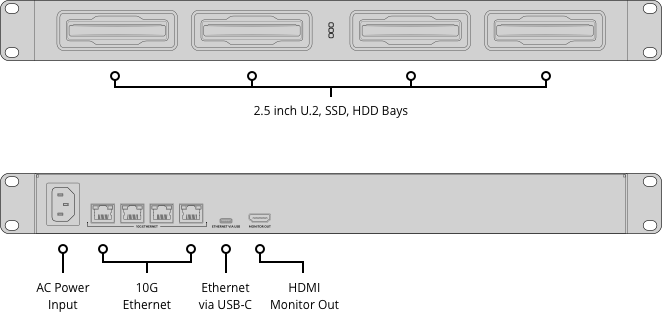
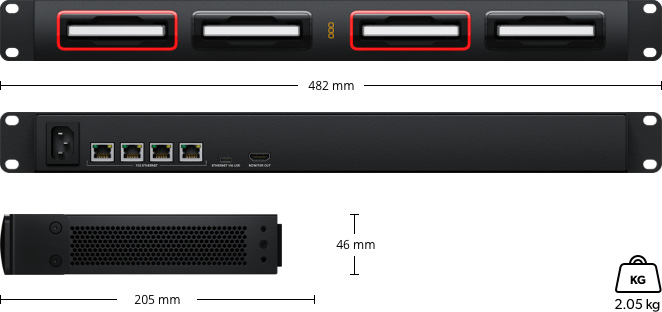
The enclosure accommodates four independent 2.5 inch drives and supports both SATA SSDs and high performance U.2 NVMe disks. Each disk is presented separately on the network, allowing teams to work from original camera media while maintaining clear separation between projects or shoots. Hot swap support ensures drives can be inserted or removed without shutting the system down, making it well suited for fast paced production environments where media is constantly changing.
Connectivity is a core strength of this solution. Four integrated 10G Ethernet ports provide extremely high bandwidth and low latency access for multiple workstations at the same time. This ensures smooth playback and editing even with high resolution formats such as large digital cinema files. The network design allows editors, colourists, sound designers and visual effects artists to work concurrently from the same storage pool without bottlenecks.
Global collaboration is enabled through native Blackmagic Cloud integration. Media can be synchronised automatically between multiple locations so that each site has a fast local copy of the same files. Proxy workflows are fully supported, allowing timelines and associated media to be shared quickly while original camera files continue syncing in the background. This approach reduces bandwidth usage while preserving a responsive editing experience.
For monitoring and management, an HDMI output provides a live graphical overview of storage status, user activity, network performance and cloud synchronisation. Individual activity indicators on each slot show disk access at a glance. Configuration and software updates are handled via Ethernet or USB C using Blackmagic Cloud Setup, making installation straightforward without specialised IT knowledge. Power is supplied by an internal universal AC power supply, ensuring reliable operation worldwide.